You can use subinacl (available here : http://www.microsoft.com/download/en/confirmation.aspx?id=23510)
subinacl /testmode /noverbose /outputlog=c:\mytest.log /subdirec=directoriesonly c:\*.* /findsid=domain\username
jeudi 8 mars 2012

Install NPS (Network Policy Server) - Radius
Description
The VPN (Virtual Private Network) allows users to connect from the Internet in their company. This connection is encrypted in a tunnel, so that data can not be recovered by a possible pirate.
The authentication procedure may be made either by e-certificate or by account / password. We must therefore choose the method that works for you.
Principle
The client connects to the VPN server, which authenticates with the Radius server (Remote Authentication Dial-In User Service) Central. After authentication, the client received his VPN company IP address, which allows access to company data, as if it were on the site.
Authentication: verification and control of User ID and Password in the Radius Client
This is a protocol used by machines to authenticate an user of a service or providing feedback on this user (traffic volume, connection time, ...). By extension, it is called Radius server or proxy server to tell server or proxy using the Radius protocol to communicate.
RADIUS uses UDP.
On Windows Server 2008R2 service Radius (IAS) was replaced by NPS (Network Policy Server).


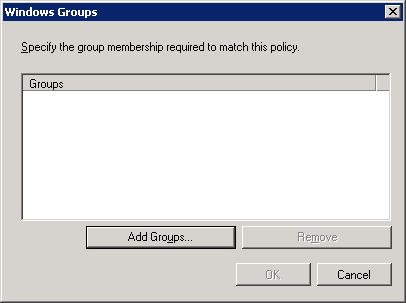


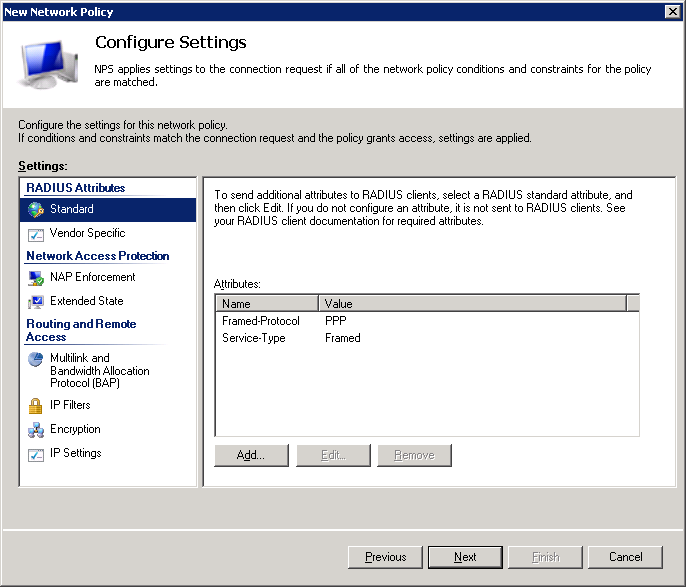


The VPN (Virtual Private Network) allows users to connect from the Internet in their company. This connection is encrypted in a tunnel, so that data can not be recovered by a possible pirate.
The authentication procedure may be made either by e-certificate or by account / password. We must therefore choose the method that works for you.
Principle
The client connects to the VPN server, which authenticates with the Radius server (Remote Authentication Dial-In User Service) Central. After authentication, the client received his VPN company IP address, which allows access to company data, as if it were on the site.
Authentication: verification and control of User ID and Password in the Radius Client
This is a protocol used by machines to authenticate an user of a service or providing feedback on this user (traffic volume, connection time, ...). By extension, it is called Radius server or proxy server to tell server or proxy using the Radius protocol to communicate.
RADIUS uses UDP.
On Windows Server 2008R2 service Radius (IAS) was replaced by NPS (Network Policy Server).
How to find HBA WWN number on ESX server
Select the ESX host in the VI client > Select the Configuration tab > Select Storage Adapters> and on the right hand side the storage adapters are listed. If you select one it should list the details of the hba in the section on the bottom right of the screen.

Clone a virtual machine without vmkfstools
Clone a virtual machine without vmkfstools:
Power Off Server-A
scp -r /vmfs/volume/LUN25/Server-A/ /vmfs/volume/LUN30/Server-B/
or
cp -r /vmfs/volume/LUN25/Server-A/ /vmfs/volume/LUN30/Server-B/
cd /vmfs/volume/LUN30/Server-B
modify all names from Server-A to Server-B
mv ServerA-flat.vmdk ServerB-flat.vmdk
mv ServerA.vmdk ServerB.vmdk
mv ServerA.nvram ServerB.nvram
mv ServerA.vmx ServerB.vmx
mv ServerA.vmxf ServerB.vmxf
mv ServerA.vmsd ServerB.vmsd
modify all referrences inside the .vmdk .vmx .vmxf from Server-A to Server-B
delete all vmware*.log files
vmware-cmd -s register Server-B.vmx
vmware-cmd Server-B.vmx start
Power Off Server-A
scp -r /vmfs/volume/LUN25/Server-A/ /vmfs/volume/LUN30/Server-B/
or
cp -r /vmfs/volume/LUN25/Server-A/ /vmfs/volume/LUN30/Server-B/
cd /vmfs/volume/LUN30/Server-B
modify all names from Server-A to Server-B
mv ServerA-flat.vmdk ServerB-flat.vmdk
mv ServerA.vmdk ServerB.vmdk
mv ServerA.nvram ServerB.nvram
mv ServerA.vmx ServerB.vmx
mv ServerA.vmxf ServerB.vmxf
mv ServerA.vmsd ServerB.vmsd
modify all referrences inside the .vmdk .vmx .vmxf from Server-A to Server-B
delete all vmware*.log files
vmware-cmd -s register Server-B.vmx
vmware-cmd Server-B.vmx start
Installing VMWare-tools on Ubuntu
uname -r
sudo aptitude install build-essential linux-headers-2.6.32-23-generic-pae psmisc
# make a mount point if needed :
sudo mkdir /media/cdrom
# Mount the CD
sudo mount /dev/cdrom /media/cdrom
# Copy and extract VMWareTools
sudo cp /media/cdrom/VMwareTools*.tar.gz /home/administrator
# You can extract with archive manager, right click on the archive and extract ... or
tar xvf VMwareTools*.tar.gz
# Install as below
cd /home/administrator/vmware-tools-distrib
sudo ./vmware-install.pl
During vmware-install.pl, choose the default answers to everything (just hit the <enter> key).
sudo aptitude install build-essential linux-headers-2.6.32-23-generic-pae psmisc
# make a mount point if needed :
sudo mkdir /media/cdrom
# Mount the CD
sudo mount /dev/cdrom /media/cdrom
# Copy and extract VMWareTools
sudo cp /media/cdrom/VMwareTools*.tar.gz /home/administrator
# You can extract with archive manager, right click on the archive and extract ... or
tar xvf VMwareTools*.tar.gz
# Install as below
cd /home/administrator/vmware-tools-distrib
sudo ./vmware-install.pl
During vmware-install.pl, choose the default answers to everything (just hit the <enter> key).
jeudi 16 février 2012
Squirrelmail installation
aptitude install dovecot-common dovecot-imapd dovecot-pop3d
aptitude install squirrelmail
ln -s /etc/squirrelmail/apache.conf /etc/apache2/conf.d/squirrelmail.conf
ln -s /usr/share/squirrelmail /var/www/squirrelmail
chgrp -R www-data /usr/share/squirrelmail/
aptitude install squirrelmail
ln -s /etc/squirrelmail/apache.conf /etc/apache2/conf.d/squirrelmail.conf
ln -s /usr/share/squirrelmail /var/www/squirrelmail
chgrp -R www-data /usr/share/squirrelmail/
vendredi 10 février 2012
check_centreon_remote_storage returns negative value for a disk
You monitor a disk with a capacity of several terra bytes.
The values returned by the plugin check_centreon_remote_storage are negative.
You can fix this by editing the plugin check_centreon_remote_storage.
replaces this
##############################
$tot = 1;
$tot = $Size * $AllocationUnits;
if (!$tot){$tot = 1;}
$used = $Used * $AllocationUnits;
$pourcent = ($used * 100) / $tot;
##############################
by this
##############################
$tot = 1;
# PIEBRA modification
if ($Size < 0){$Size += 2**32;}
if ($Used < 0){$Used += 2**32;}
# END PIEBRA
$tot = $Size * $AllocationUnits;
if (!$tot){$tot = 1;}
$used = $Used * $AllocationUnits;
$pourcent = ($used * 100) / $tot;
##############################
And everything will be OK!
The values returned by the plugin check_centreon_remote_storage are negative.
You can fix this by editing the plugin check_centreon_remote_storage.
replaces this
##############################
$tot = 1;
$tot = $Size * $AllocationUnits;
if (!$tot){$tot = 1;}
$used = $Used * $AllocationUnits;
$pourcent = ($used * 100) / $tot;
##############################
by this
##############################
$tot = 1;
# PIEBRA modification
if ($Size < 0){$Size += 2**32;}
if ($Used < 0){$Used += 2**32;}
# END PIEBRA
$tot = $Size * $AllocationUnits;
if (!$tot){$tot = 1;}
$used = $Used * $AllocationUnits;
$pourcent = ($used * 100) / $tot;
##############################
And everything will be OK!
Inscription à :
Articles (Atom)